


The Program: College Football
4.56.41K Reviews
App Specs
- Version
- 1.17.1
- Updated On
- License
- Free
- Downloads
- 500,000+
- Developer
- Fantasy Moguls, Inc.
- Categories
- Sports
- Platform
- Android
Screenshots
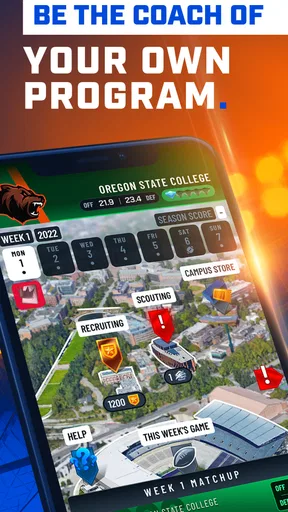
 Analysis by AppCompare
I like sports games that give me a reason to think between the big moments, and college football is a natural fit for that. The Program: College Football puts the emphasis on running a team rather than simply watching a match unfold. Its appeal is the back-and-forth between making choices, seeing how they play out, and deciding what to change next. That rhythm suits short visits as well as longer sessions, though it is best for players who enjoy management and tactics more than direct, hands-on action.
Getting Started: First Impressions
When I first launched the game, I was immediately struck by its sleek interface. It’s intuitive and doesn’t bombard you with too much info right off the bat. You know how some apps just feel cluttered? Not this one. It’s like a well-organized playbook; everything you need is right at your fingertips.
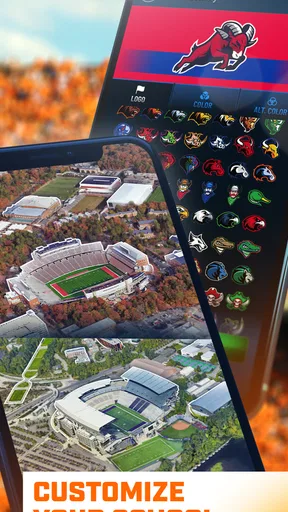
Setting up my team was a breeze. The game walks you through the process without hand-holding too much. You get to pick your team name, colors, and start drafting your squad. I gotta say, the customization options are pretty sweet—definitely more robust than I expected. You’ve got control over every little detail, from play formations to player stats.
What to Decide Before You Settle In
The first useful question is what kind of sports game you want. If you want to control every movement on the field, this management-focused approach may feel indirect. I’d choose it when I’m in the mood to plan a roster and make coaching decisions, not when I want a fast arcade match. That distinction matters: the satisfaction comes from shaping a team and living with the result, rather than relying on quick reflexes.
It also helps to treat setup as the start of your strategy rather than a cosmetic stop. A team name and colors make the club feel yours, but the more consequential choices are the ones tied to squad composition and tactics. I would avoid trying to perfect every detail immediately. Pick a coherent direction, get into play, and use the results to work out what needs changing. That way, early decisions become a learning loop instead of a long menu session.
Diving Into Gameplay
Now, let’s talk about the gameplay. This is where the magic happens. The app offers a mix of strategy and action, making you feel like a genuine football coach. You’re not just a spectator; you’re in the game, making the calls, and it’s honestly exhilarating.
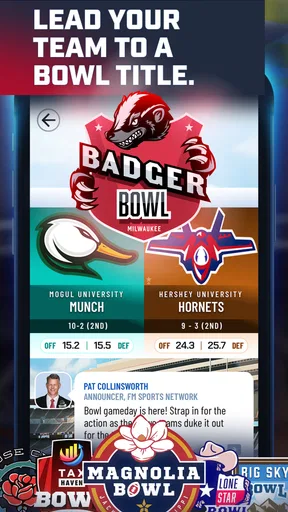
The matches themselves are intense, and the level of detail is impressive. You can almost feel the crowd’s roar through your phone. The app does a fantastic job of simulating real-life college football dynamics, from weather effects to player injuries. Each decision you make can change the course of a game, and that’s what keeps you on the edge of your seat.
Worth Reading Before You Choose

EA SPORTS FC Mobile 26 Is a Bigger Football Game, but It Takes Time

Flipboard Shows What News Apps Must Do Beyond the Feed

Switching to Android Auto Means Rethinking Your Driving Routine

Google Calendar Makes a Crowded Week Easier to Manage

Ludo King Makes the Most of the Minutes Between Plans

Baby Panda World Brings Quick Play to Modern Phones, but Its Game Library Feels Busy
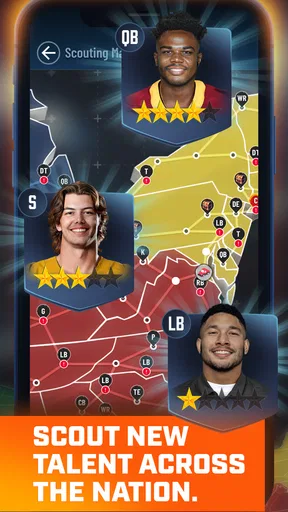
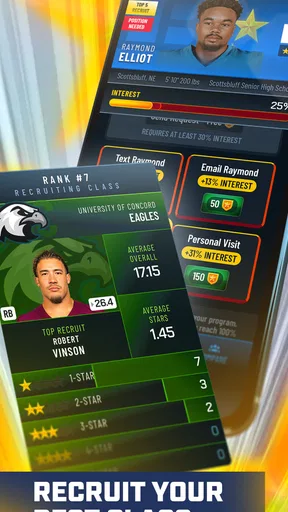
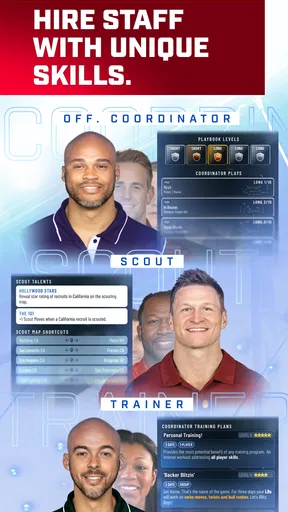
One of the features I loved is the recruitment process. It’s not just about picking players with the highest stats. You’ve gotta consider their potential and how they fit into your overall strategy. It’s like a chess game, and I found myself getting really invested in building my dream team.
Reading Results Instead of Chasing Numbers
A useful habit is to judge a player in context. Recruitment can tempt you to chase the most impressive-looking stats, but a strong individual choice is only valuable if it supports the way you want the team to play. I’d keep a simple mental note after each match: what was the plan, what seemed to work, and where did the team struggle? That gives you a practical reason to adjust a formation or rethink a future recruit, instead of changing several things at once and losing track of why.
Injuries and changing conditions also make a match feel less like a fixed puzzle with one obvious answer. When circumstances shift, I’d resist the urge to force the original plan just because it looked good before kickoff. The better coaching decision may be a modest adjustment that protects the team’s strengths. This is one of the more interesting trade-offs in a management game: planning matters, but being attached to a plan can become its own weakness.
For a realistic everyday session, I can see myself opening the game during a quiet break, checking the next team decision, and playing through a match with one question in mind—whether the current approach is producing the kind of performance I want. Afterward, I’d make one targeted change and leave the next session with something to test. That makes a short visit feel purposeful, while a longer stretch can be spent shaping the roster and comparing outcomes over time.
Features Worth Highlighting
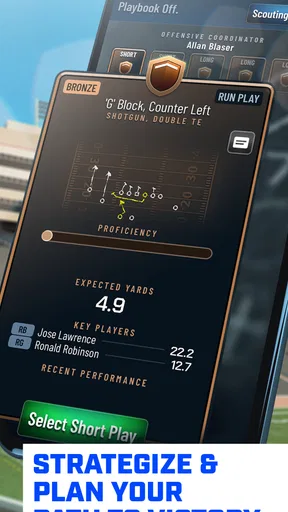
Customization is a big deal here. You can tweak your team’s playbook, adapt to different opponents, and switch up your tactics on the fly. It’s this level of control that makes the game feel fresh every time you play.
“It’s like having your own college football dynasty right in your pocket.”
There’s also a cool multiplayer mode where you can challenge friends or random opponents. It’s a great way to test your skills and see how your strategies stack up against real players. And trust me, there’s nothing quite like the satisfaction of outsmarting your buddy.
When Competition Helps—and When It Doesn’t
Playing against another person changes the value of a tactic. A plan that seems dependable against the game’s situations may be easier for a human opponent to read, so multiplayer is a good place to test whether your approach is flexible rather than merely familiar. I’d use it after I have a basic sense of my team, not as the only way to learn the game. That keeps a loss useful: I can look for a decision to reconsider instead of treating the result as proof that the whole roster is wrong.
If I’m mainly looking for a relaxed solo sports experience, the team-building side is the stronger reason to play. If I want the unpredictability of another person making choices, challenging friends or other opponents offers a different kind of feedback. Neither mode is automatically better; it depends on whether I want to refine a plan privately or see how it holds up against someone else.
How It Fits Among Sports Games
Compared with the usual mobile sports alternatives, this is a better fit for someone who enjoys the coach’s seat. Arcade-style football games put the immediate action first, while fantasy formats often make the roster itself the main attraction. Here, the combination of recruitment, tactics, and match decisions gives me a broader team-management focus. If your favourite part of sports is controlling each play directly, those other styles may be more satisfying. If you like debating who belongs in the squad and how the team should respond, this is the more natural choice.
That focus is also a limit. Management decisions need room to breathe, and a player who wants constant new animations or fast rounds may find the pace less exciting. I wouldn’t recommend it as a substitute for watching real college football or for a simulation built around direct on-field control. I would recommend it to a fan who enjoys the strategic questions around a season and wants those questions in a game format.
Visuals and Sound
The graphics are solid, with detailed player models and realistic stadiums. The animations during plays are smooth, and I didn’t notice any lag, even during intense moments. The sound effects add to the immersion, with the crowd’s cheers and the referee’s whistle creating an authentic atmosphere.
However, if there’s one thing I’d love to see improved, it’s the commentary. It can get a bit repetitive, but that’s a minor gripe compared to the overall experience.
Practical Fit and Expectations
The game is free to play, with optional in-app purchases priced from 99 cents to $9.99 per item. I’d approach those purchases as optional rather than part of the basic reason to try it: the core appeal is whether team management and tactical decisions are fun for you. Before spending, I’d first see whether I enjoy the repeat cycle of planning, playing, and adjusting. That is a more useful test than assuming that paying will make a management game suit my taste.
It is rated for Everyone, and the developer is Fantasy Moguls, Inc. The game was released on September 6, 2022, and version 1.14.19 is listed for devices running Android 7.0 or later. On the store, it has an average rating of 4.5 from around 23,000 ratings, with about 6,300 written reviews and over 100,000 installs. Those figures suggest it has found an audience, but they can’t tell you whether its slower, decision-led style matches what you personally want from a sports game.
One practical point I’d keep in mind is that I don’t need to treat every session as a full rebuild. If I return with a specific question—whether a tactical adjustment helped, or whether a recruit fits the current plan—I’m less likely to make random changes. That approach also makes the game easier to pick back up after a break, because the next action has a clear purpose rather than requiring me to reconsider the whole team.
Final Thoughts
After spending time with the game, I can confidently say it’s a must-try for any sports fan who enjoys strategy. Whether you’re a die-hard college football enthusiast or just someone who loves a good management game, it has something for you. I’d be more cautious recommending it to someone who wants direct control of every moment or who gets bored by roster decisions; that player may be happier with a more action-focused sports game.
The combination of strategic depth and engaging gameplay makes it stand out in the crowded mobile gaming market. The feedback from matches gives the next decision its purpose: a result can validate a plan, expose a weakness, or make a new recruit feel worthwhile. Then the team is ready for another test. The weaker point is that repeated commentary can wear thin, and the deliberate management focus won’t suit every mood, but neither issue cancels out the satisfaction of making a thoughtful call and seeing what follows.
The Program: College Football is free, belongs to the sports category, and has an average rating of 4.5. I’d recommend giving it a try if you like building a team as much as watching one compete. Start with a clear tactical idea, pay attention to what the matches teach you, and make your next change for a reason. That is the loop that kept me interested: choose, see the response, take the lesson, and come back ready to see whether the next decision works better.
Pros
- Comprehensive team stats and rankings.
- Live game updates and scores.
- Customizable notifications for games.
- User-friendly interface design.
- Includes historical data and trivia.
Cons
- Occasional ads disrupt navigation.
- Limited video highlights available.
- Requires constant internet connection.
- Some features behind a paywall.
- Minor bugs on older devices.
FAQs for The Program: College Football
What platforms is The Program: College Football available on?
The Program: College Football is available for both Android and iOS devices. Users can download it from the Google Play Store or Apple’s App Store. Ensure your device meets the minimum system requirements for a smooth gaming experience. Regular updates are provided to enhance features and fix any bugs.
Does The Program: College Football require an internet connection?
Yes, The Program: College Football requires an active internet connection for optimal gameplay. This is necessary for accessing real-time updates, leaderboards, and multiplayer modes. While some features might be available offline, to fully enjoy the game and its community features, a stable internet connection is recommended.
Are there in-app purchases in The Program: College Football?
The Program: College Football offers optional in-app purchases. These purchases can enhance the gaming experience by providing additional content, customization options, or power-ups. However, all essential gameplay features can be accessed without spending money. Users can manage or disable in-app purchases through their device settings.
Is The Program: College Football suitable for all age groups?
The Program: College Football is designed to be family-friendly and suitable for all ages. However, it is recommended for players aged 12 and above due to strategic gameplay elements. Parents can use parental controls to manage the app’s accessibility and monitor any in-app purchases or interactions.
How can I report a bug or issue in The Program: College Football?
If you encounter any bugs or issues while playing The Program: College Football, you can report them through the app’s support section. The developers are committed to improving the game and encourage players to provide feedback. Ensure you provide detailed information to help address the problem efficiently.


